AI Search & AI Visibility
How to Claim Your ChatGPT Business Profile
By Saahil Choudhri · Updated 12 November 2026
Learn how eligible India and US businesses can claim a ChatGPT profile, verify ownership, update details and check insights and citations.
A simple guide for small businesses in India and the United States
When a customer asks ChatGPT about your business, the answer can influence whether they visit your website, compare you with another provider or contact you. Accurate information matters at that moment.
OpenAI introduced Businesses in ChatGPT on 10 November 2026. Its Business Hub gives eligible businesses a way to claim their organization, supply current information and review aggregate engagement. Some US businesses can also publish a Business Agent.
What is a ChatGPT business profile?
It is the business information a customer can open inside ChatGPT. Business Hub is the management area behind that experience. Think of the profile as the customer-facing business card and the Hub as the place where an authorized person maintains it.
A ChatGPT Business subscription is a workspace plan for using ChatGPT with a team. A business profile serves a different purpose: representing a business to potential customers. Buying a team subscription alone does not complete a profile claim.
Why should a small business care?
| Opportunity | Practical value |
|---|---|
| Correct information | Help customers find the right website, offering and policies. |
| Clearer discovery | Understand the themes associated with your business in available insights. |
| A measurable next step | Compare website clicks with enquiries and sales recorded by your own business. |
| Better preparation | Keep one approved set of business facts that staff and agencies can maintain. |
| Set the right expectation. Claiming is an information and measurement step. OpenAI does not promise higher placement or more sales. |
|---|
Use the eligibility table first, then follow the claim route. Screens differ by business and verification method. Live captures, OpenAI-published examples and process diagrams are labelled separately throughout this guide.
01 / ELIGIBILITY
Can businesses in India and the US claim a profile?
India and the United States are both supported ChatGPT countries. Country support is only the first check: business type, verification support and integrity checks also matter. Do not assume every business in either country will be approved.
| Business type | India | United States |
|---|---|---|
| Online business with a website | An eligible online business can apply where the required verification is supported. | An eligible online business can apply. |
| Local store or restaurant | The current local-listing claim route is not offered for Indian locations. | Currently limited to claiming an existing US listing. |
| Business Agent | The published launch eligibility does not include India. | Available to eligible ecommerce and online service businesses with a website; category checks apply. |
Eligibility summary: OpenAI’s setup guide and launch information. Recheck the current rules before applying; this is a beta rollout.
Three examples
An Indian online home-decor brand should check the online-business claim route. An Indian neighbourhood café should not select a US location or create a false US address to get around local-listing limits. A US online retailer may qualify for a profile and an agent, but must still pass the applicable checks.
Prepare this before you start
| Have ready | Zaillor’s preparation advice |
|---|---|
| The right account | Choose the account your business intends to keep using. Record who is responsible for it. |
| An accurate website | Check the homepage, contact page, offering and policies before providing the URL. |
| Access to verification channels | Know who controls the business phone, business email, domain DNS or Shopify account. |
| Authority and records | Have the business owner available and keep official business records consistent. |
| Approved copy and images | Prepare a factual description and logos/photos you have permission to use. |
| Avoid duplicates. Search carefully before adding a new business. A spelling variant or another location may already exist. Manage only a business you own or are authorized to represent. |
|---|
02 / START
Step 1. Open Business Hub and sign in
Open the official Business Hub → https://chatgpt.com/business-hub
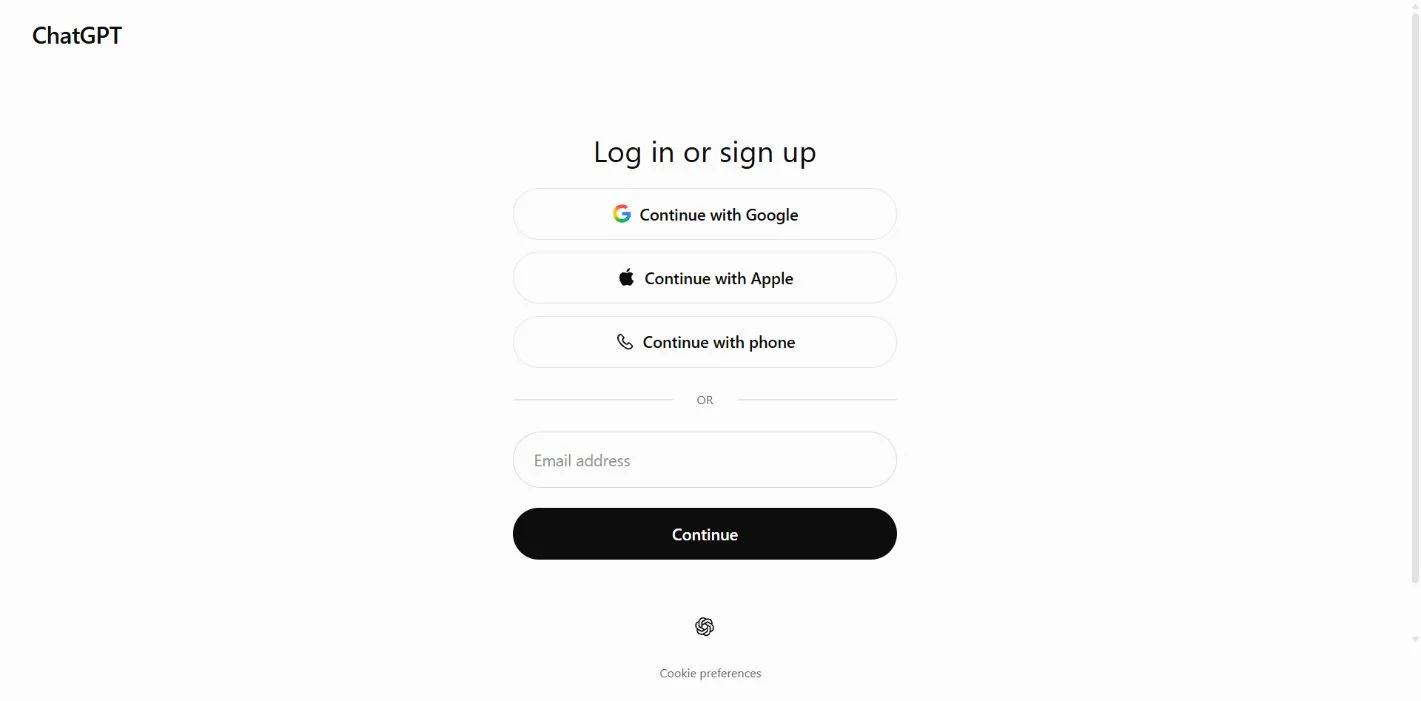
If the sign-in screen appears, use your usual sign-in method. For the email route, enter the address of the ChatGPT account you intend to use, then select Continue. Follow the authentication prompts. Never enter your email password into a business-description field.
Step 2. Search for your business
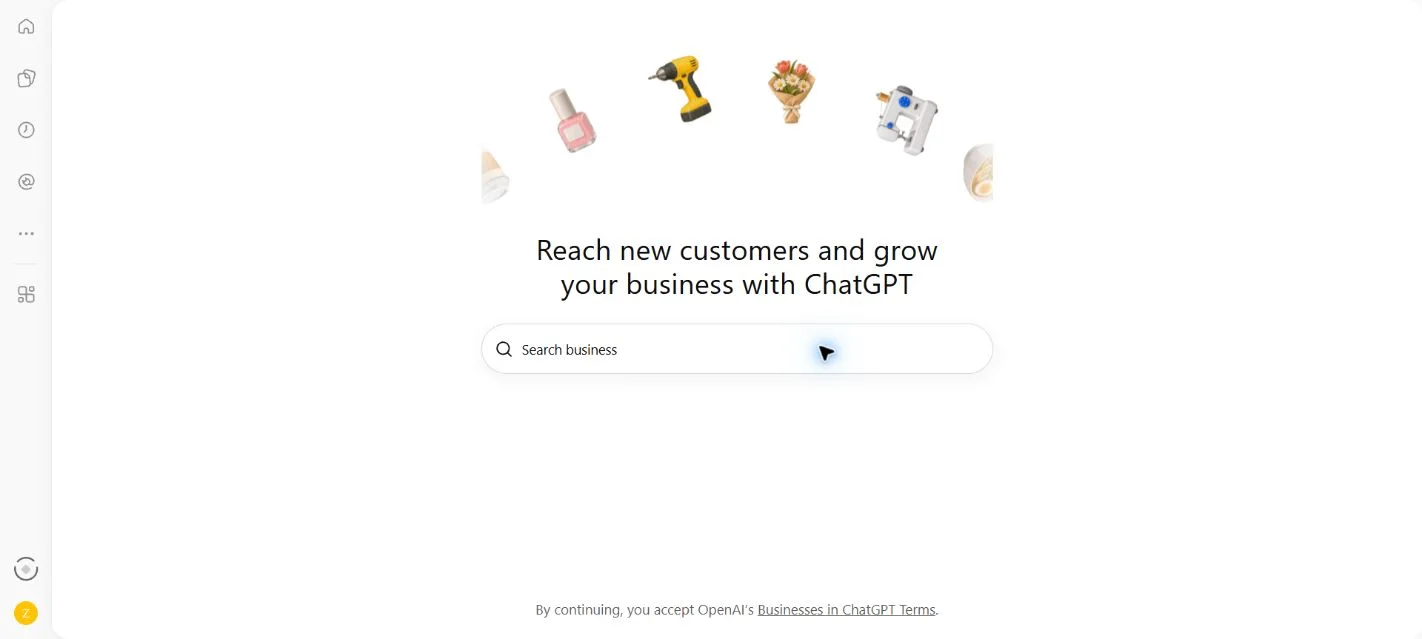
Click Search business and enter the business name. Use the real name customers know; do not add phrases such as “best” or “number one” to manufacture a different listing.
03 / MATCH
Step 3. Select the correct listing or inspect the add option
Check the name, website and location of a matching result before selecting it. If the business is missing, an eligible online business may be offered an add/create route. The example below shows the actual result for Zaillor on the capture date.
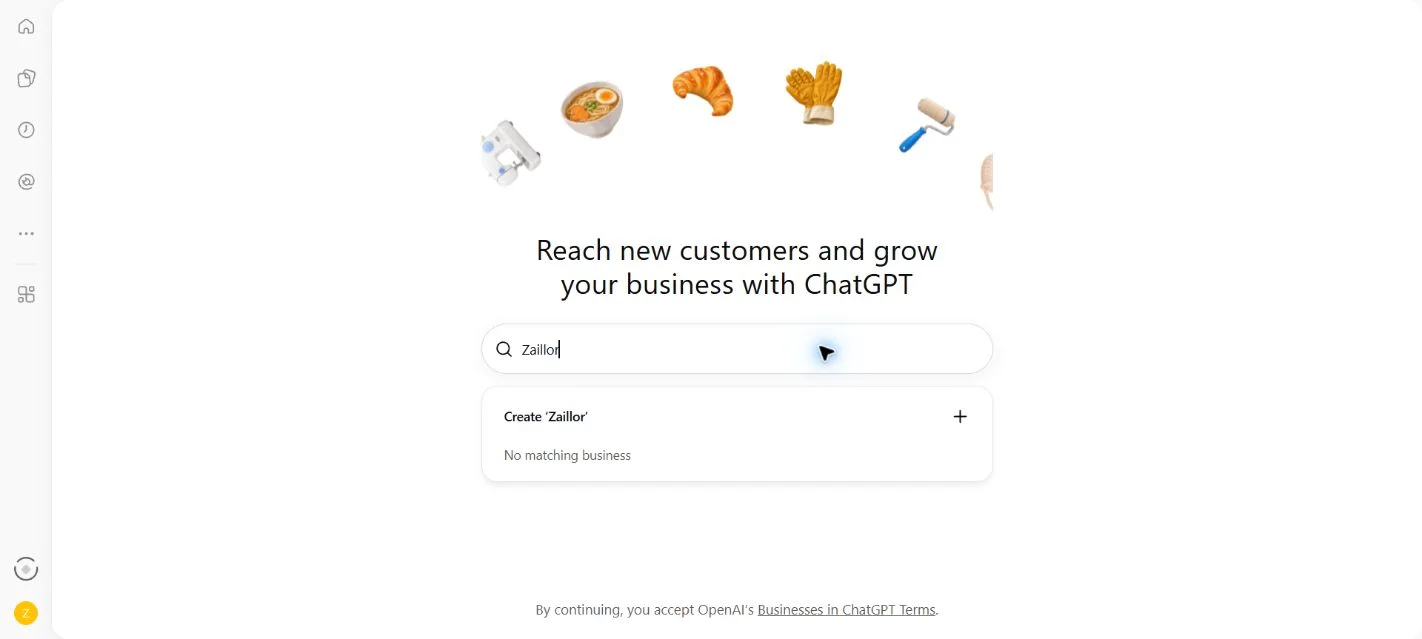
| Read before continuing. The captured search page says continuing accepts the Businesses in ChatGPT Terms. Start creation only when the business owner or authorized representative is ready to make that commitment. |
|---|
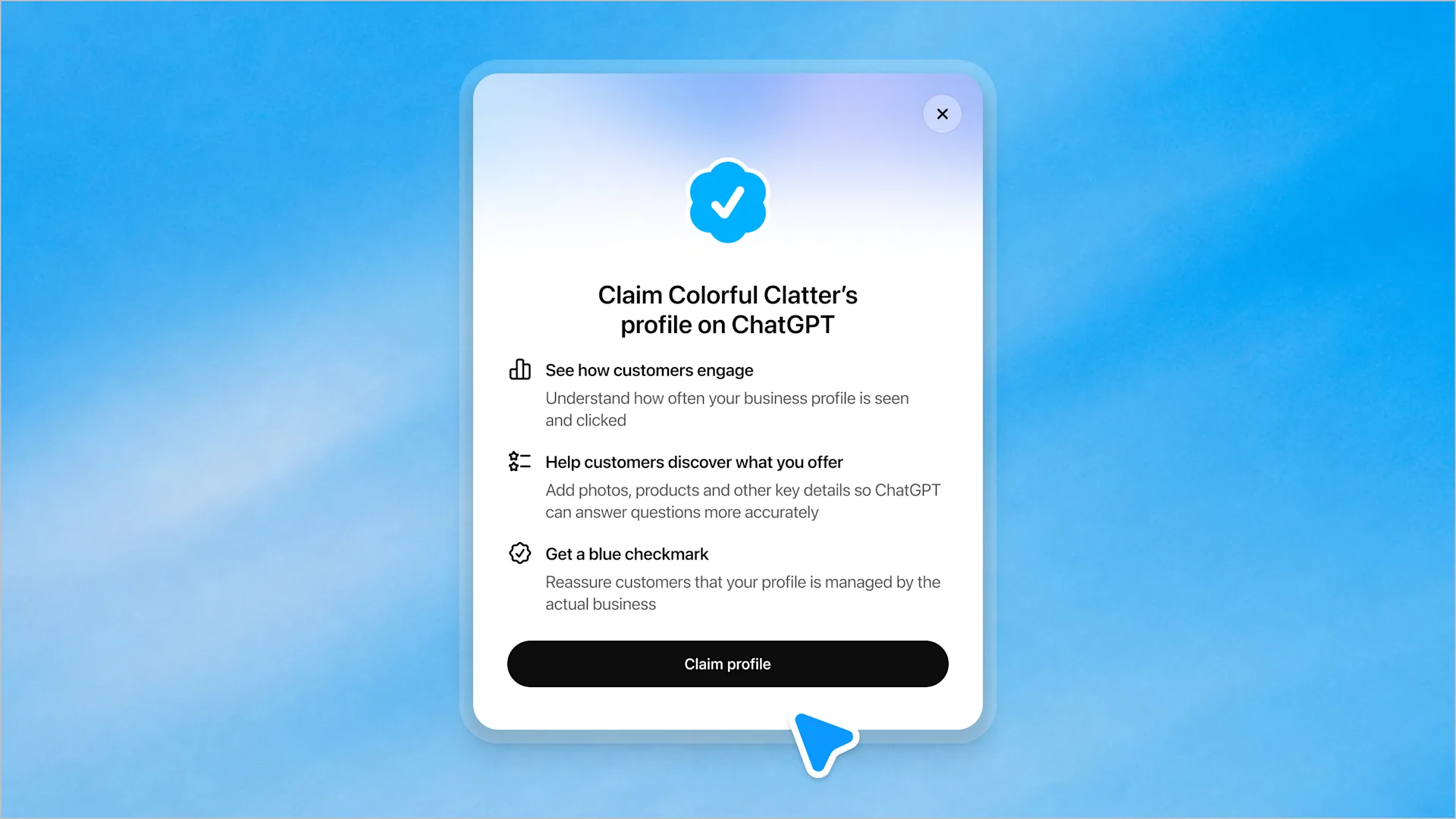
For a matching existing listing, OpenAI’s published example shows a Claim profile button. Always check the actual name in the dialog. Do not claim an unrelated business just to learn the process.
04 / OWNERSHIP
Step 4. Follow the verification route you are offered
Confirm the managing account, then use one offered method. Availability can differ by business.
PROCESS DIAGRAM · Claim route
| Order | What happens |
|---|---|
| 1 | Choose your business → confirm the managing account |
| 2 | Choose an available ownership verification method |
| 3 | Complete the requested proof → wait for the decision |
Read from top to bottom. This is a process diagram, not a screenshot.
| Route | Documented click path / entry |
|---|---|
| Phone | Business phone → SMS or call → Get code → enter the code. |
| Business email | Business email → Get code → enter the emailed code. |
| Website domain | Website domain → add the displayed TXT record → Verify domain. |
| Shopify | Shopify store → Connect Shopify → review permissions → Log in to Shopify. |
Verification routes and labels: OpenAI setup guide. This table is an instruction reference, not a capture of account-specific verification screens.
What should you enter?
For a code route, enter only the code issued for that verification attempt. Do not reuse a password, a code from an unrelated service or an example printed in a guide. If the number or address is wrong, investigate the listing rather than asking someone else to forward their code.
For domain verification, the values are unique to your claim. Send the exact displayed record to the person who manages your website’s DNS. Ask them to add it without replacing unrelated records. Return to the claim screen after they confirm the change, then use the verification control. A website developer and a DNS administrator may be different people.
| Zaillor’s handoff template. “Please add the TXT verification record displayed in our Business Hub claim. Copy the record type, host/name and value exactly. Confirm when it is live. Please leave existing website and email records intact.” |
|---|
For Shopify, use the correct store and inspect the permissions before approving. A store connection should be handled by an authorized store administrator. This route is optional; having a Shopify store is not the same thing as having an approved Business Agent.
05 / IDENTITY
Step 5. Complete the identity check when prompted
After claim approval, Persona identity approval unlocks publishing changes, insights and eligible agents. The blue check follows Persona approval.
PROCESS DIAGRAM · Identity and approval
| Order | What happens |
|---|---|
| 1 | Open your business’s verification prompt |
| 2 | Select Verify with Persona / Continue to Persona when shown |
| 3 | Follow the provider’s requested information and document checks |
| 4 | Wait for approval or a request for corrections |
Read from top to bottom. This is a process diagram, not a screenshot.
Handle this step as the business owner
Use the genuine representative’s details and the business’s real records. The responsible person should complete sensitive identity steps directly. Keep identity documents out of website screenshots, marketing decks and agency chat groups. If another person assists, they should help interpret the instructions without impersonating the representative.
Prepare a consistent spelling of the business name and a reliable point of contact. For an Indian company, keep relevant registration records available; for a US company, do the same with its official registration records. Submit only the documents and identifiers the actual verification flow requests. There is no universal document checklist that fits every business.
| Publication consequence. When Persona is used to create a new profile, OpenAI says approval automatically publishes it. Review the business details before completing that route. Agent publication is a separate step. |
|---|
Before you finish: a four-point review
| Check | What the owner should confirm |
|---|---|
| Business identity | The correct brand, website and location are selected. |
| Authority | The person acting has the business’s permission. |
| Accuracy | Details match the business’s records and public website. |
| Readiness | The business is comfortable with the information becoming public where applicable. |
Do not treat an “under review” message as success. Save the status and watch for the decision. If there is a correction request, address the specific mismatch instead of repeatedly submitting different versions of the business name.
06 / INFORMATION
Step 6. Make the profile useful to a customer
Once the required approvals are complete, review the business information in the Hub. Prepare clear descriptions of your offering and policies; keep factual claims supportable.
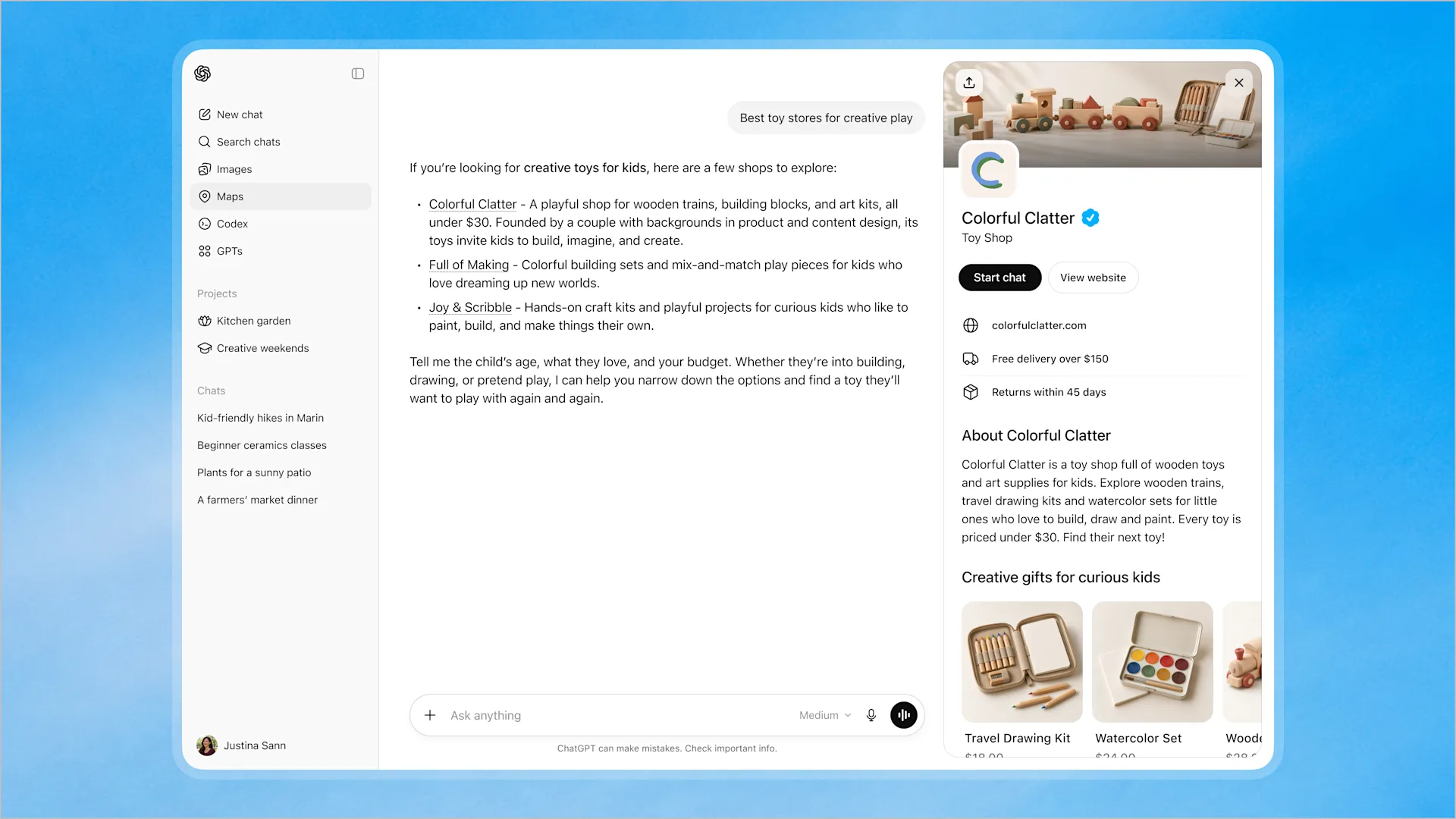
| Information | A clear example to prepare |
|---|---|
| Name and website | Use the recognized business name and the correct main domain. |
| Description | “We sell handmade cotton home textiles online and ship across India.” |
| Offering and market | Describe what you sell and where customers can obtain it. |
| Delivery and returns | Explain real delivery coverage, exclusions and return conditions. |
| Images | Use current, authorized images rather than unsupported badges or awards. |
These are writing examples, not promises that every profile has an identical set of fields. Keep the website, profile and customer-support answers consistent. If a policy changes, update the underlying website as well as the profile information you manage.
Avoid descriptions such as “ChatGPT’s officially recommended agency” unless you have a specific, valid basis for that claim. A verification badge does not establish an endorsement of your products or services.
07 / MEASUREMENT
Step 7. Read your visibility insights
Business Hub’s insights combine business discovery and website engagement into an aggregate view. Use the business’s Insights area after the required approvals.
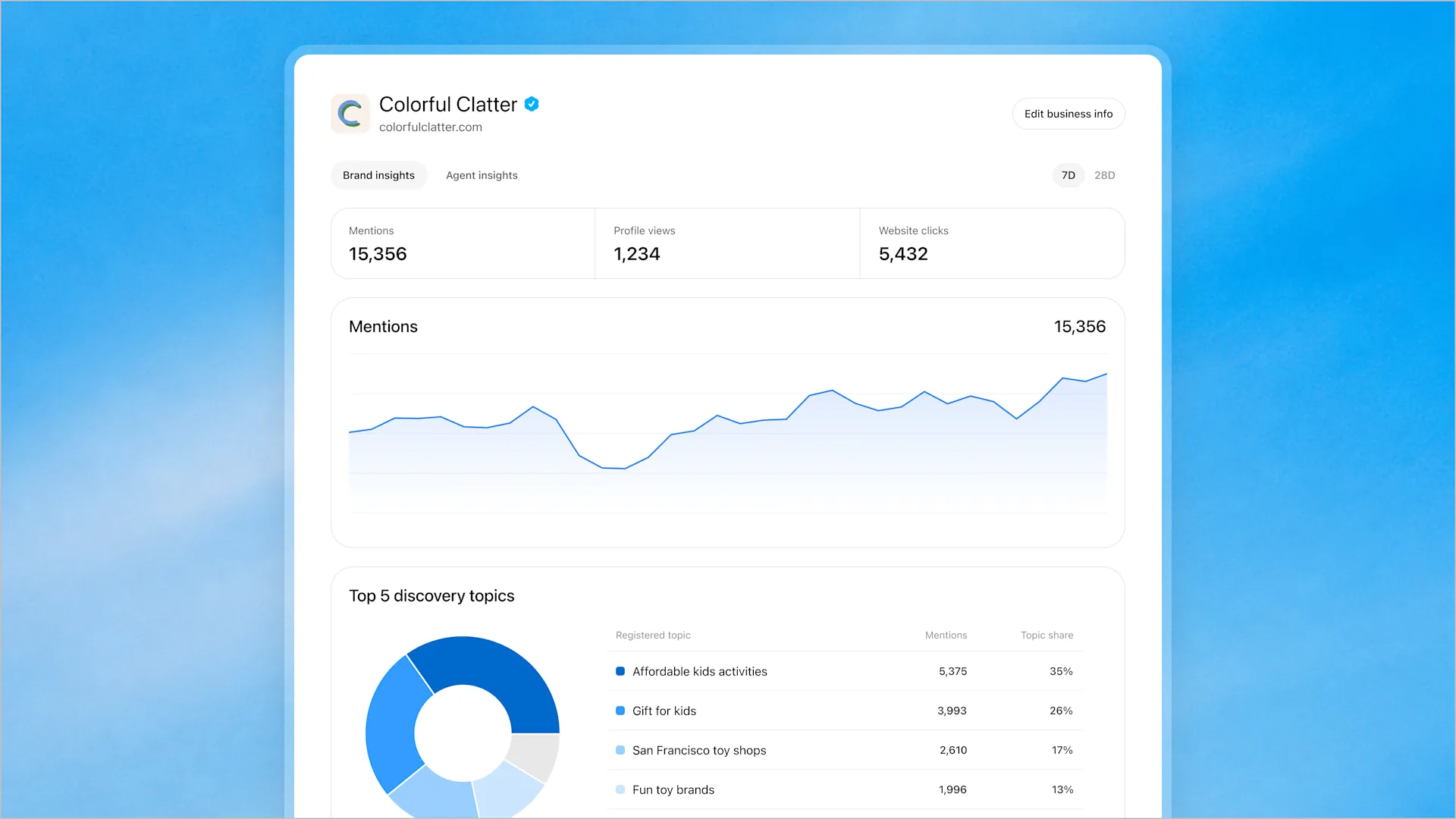
| Signal | How to interpret it |
|---|---|
| Mentions | For an online business, the documented count requires a reference to its website; a brand name alone is not enough. |
| Website clicks | A visit action toward your site. It is not automatically a lead, purchase or completed booking. |
| Discovery topics | Themes associated with responses where the business is mentioned or cited; not a list of individual user questions. |
| Blank data | Can reflect reporting thresholds or unavailable/incomplete data. Do not automatically label it zero. |
Definitions: setup guide. The guide currently describes a 28-day activity view; beta interfaces and available controls can differ.
Zaillor recommends recording a baseline before making changes. Compare the same reporting period on each review, note when you updated information and keep a record of meaningful website changes. A rise after an edit is useful to investigate; it does not prove that the edit caused the rise.
08 / CITATIONS
Step 8. Check citations without confusing them with customers
A citation is a source reference attached to an answer. It may link to your website or to a third-party page discussing your business. Claiming a profile does not give you a list of identifiable people who mentioned you or access to their private chats. OpenAI’s business insights are aggregated.
A repeatable five-minute check
| Action | What to do |
|---|---|
| 1. Ask a realistic question | Use a buyer’s question, such as “Which online stores ship handmade cotton cushion covers across India?” |
| 2. Include useful context | For a US service business, specify the service and city. Use the same wording in later comparison checks. |
| 3. Inspect the answer | Record whether your brand appears and whether there is a source reference. |
| 4. Open the source | Select the citation or Sources control when available. Open each relevant link and check what it actually says. |
| 5. Save the observation | Record the date, prompt, visible answer, cited URL and any inaccurate fact. A single test is a sample, not total market visibility. |
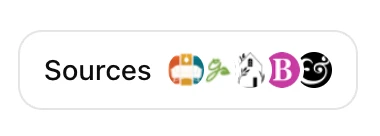
Keep a small citation log
| Prompt / market | Brand named? | Cited URL | Finding / next action |
|---|---|---|---|
| India / product query | Yes or no | Exact source URL | Check shipping information. |
| US / city + service | Yes or no | Exact source URL | Check service-area accuracy. |
| Direct brand question | Yes or no | Exact source URL | Check pricing/policy claims. |
If ChatGPT cites a directory, review that directory’s underlying information. If it cites your site, inspect the exact page rather than only your homepage. Ask for a correction through the source’s legitimate process where appropriate. Editing your profile does not directly edit a publisher’s page.
Your website analytics can help you examine referred visits and the enquiries they produce. These are separate observations: Business Hub clicks, analytics sessions and CRM leads should not be assumed to match one for one. Small samples and missing referral information can make comparisons noisy.
09 / OPTIONAL TOOLS
What else can you do after claiming?
Retailers: provide current product information
Where supported, a product feed lets retailers supply product details, prices and availability. Before connecting a feed, Zaillor recommends checking a handful of representative products: correct landing pages, currency, availability, images and policy information. Assign someone to maintain it when products change.
Eligible US businesses: test a Business Agent
An agent can explain a business’s products and policies in a clearly labelled conversation. It has separate eligibility and publication requirements. Keep its instructions accurate, avoid pressure tactics and do not invent prices, qualifications or guarantees.
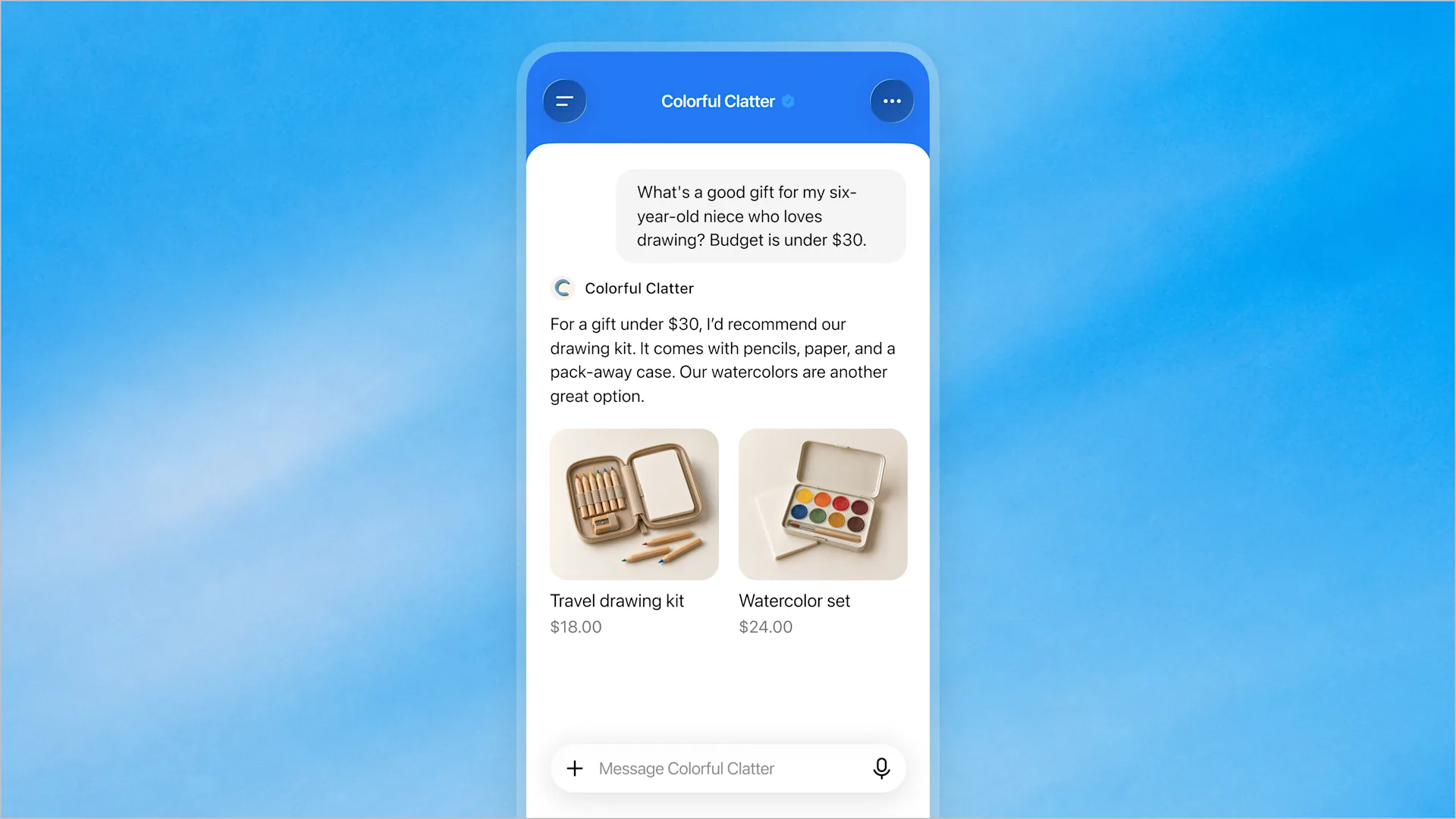
Zaillor’s test questions: “Where do you deliver?”, “What is excluded from returns?”, “What if the product is unavailable?” and “How do I reach a person?” Compare the answers with your real policies. Correct the source information and retest before publishing.
| Check capability before promising it. Treat an agent as an information experience unless the current product explicitly supports the transaction you need. Do not advertise automatic bookings, completed purchases or customer order access merely because an agent can answer questions. |
|---|
10 / MAINTAIN
Common problems and a simple maintenance routine
| Problem | Practical next step |
|---|---|
| Business not found | Check spelling and website. Inspect an eligible online-business add option; local listings have narrower rules. |
| Wrong business details | Stop before claiming. Make sure you have selected your brand and location. |
| No access to phone/email/DNS | Identify the real administrator. Never borrow an unrelated business’s verification channel. |
| Pending or unsuccessful verification | Read the decision or correction message. Keep names and records consistent; use official support if the problem persists. |
| Blank insights | Wait for reportable activity and review the available period. A blank is not proof that nobody sees the business. |
| Business Agent option missing | Check eligibility and approval status. Profile access does not automatically grant agent access. |
| Business already claimed / locked | Use the ownership dispute or support route offered by the product; do not create a duplicate. |
Zaillor’s first-month routine
Day 1: record the starting details and any visible metrics. Confirm that the website tells the same story as the profile. Assign an owner for product, policy and contact updates.
After approval: inspect the customer-facing profile. Run the same small set of buyer questions, record the cited pages and check factual accuracy. If you publish an eligible agent, test awkward policy questions as well as easy product questions.
Weekly: review available metrics, website referrals and actual enquiries. Pick one information gap to fix. For example, a repeated delivery question may justify a clearer delivery page; a returns question may reveal an ambiguous policy.
Monthly: compare like periods, record changes and review whether the information remains true. Do not use one successful prompt as proof that your business ranks first in all ChatGPT answers.
How Zaillor can help
Start with the facts customers need to make a decision. A useful AI visibility review checks the accuracy of the business profile, the pages being cited and the clarity of the underlying website. It then connects visibility observations with real enquiries, rather than treating a badge or a mention as a guaranteed sale.
11 / QUICK ANSWERS
Frequently asked questions
Can every business claim a profile?
No. Eligibility and verification apply. India and the US are supported countries, but online-business, local-listing and Business Agent access follow different rules.
Do I need an ads account or Enterprise agreement?
OpenAI’s setup guide says an eligible business can claim without either. Check the live product for current charges or plan requirements; this guide does not promise permanent free access.
Does verification guarantee recommendations?
No. ChatGPT continues making independent recommendations and comparisons.
Can I find out which people asked about my company?
Business insights do not provide identifiable users or their private conversations. Use aggregate trends and your own consent-based enquiry records.
Will every mention appear in the dashboard?
Do not assume that. The documented definition for an online business requires a website reference, and reporting can be incomplete or thresholded.
Can an Indian business publish a Business Agent now?
The published launch eligibility is for eligible US ecommerce and online service businesses with a website. Recheck before planning an Indian rollout.
Does the profile replace my website?
Keep your website accurate and useful. A profile is one information surface; customers still need trustworthy detail when evaluating, buying or contacting you.
Start here. Start here. Open Business Hub, check your eligibility, find the correct business and complete the offered verification. Then maintain accurate facts and measure useful customer actions. Recheck this beta guide against OpenAI’s current instructions before using it.

Saahil Choudhri
Founder & CTO · Zaillor
14 years of experience as a software engineer, helping businesses understand how AI tools describe, rank, and perceive their brands.